
Assembly Module Complete control over assembly operations and the conversion of raw materials into finished products with efficiency and accuracy.
The Assembly Module (Simple Manufacturing) is one of the most important tools for improving production efficiency and inventory management in manufacturing facilities. It seamlessly connects raw materials, assembly processes, and finished products within a single integrated system. The module helps reduce errors associated with manual tracking and ensures that the required components are available when needed for production. It also automatically updates inventory balances whenever assembly operations begin or are completed. In addition, the module provides accurate visibility into production costs and material consumption, enabling management to make better decisions regarding planning, production, and purchasing. Through comprehensive tracking of material and product movements, it helps minimize waste, prevent inventory shortages or overstock situations, improve operational efficiency, and increase overall productivity across the factory
 Hesham Shawky Abo El ENIN - • Capital ERP for System Managment
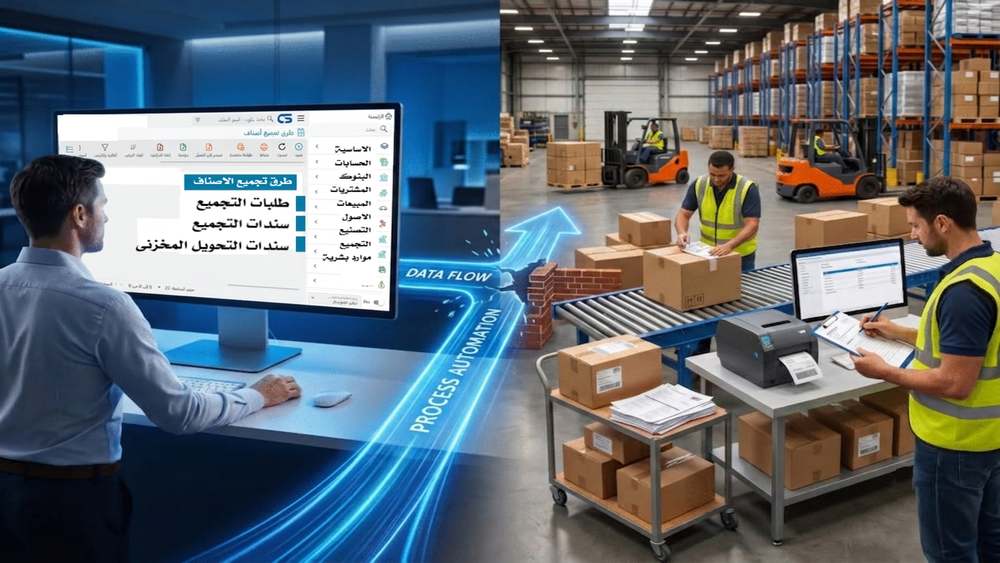
Assembly Module (Simple Manufacturing): How Does It Solve Production and Inventory Challenges in Factories?
Every day in a manufacturing facility brings recurring challenges: raw materials disappear without a clear explanation, inventory transactions are processed manually and are therefore prone to errors, and production managers often lack accurate visibility into the true cost of the products they manufacture. Added to this are weak controls over production lines, delays in fulfilling customer orders, and ongoing discrepancies between recorded inventory balances and actual stock levels on the factory floor. In the middle of all this, warehouse managers often find themselves manually tracking assembly orders without a clear system that links incoming raw materials to outgoing finished products.
These challenges are not exceptions; they are the norm in many factories that still rely on disconnected tools or separate spreadsheets to manage production operations. This is where the Assembly Module (Simple Manufacturing) in Capital Solutions ERP comes into play. The module provides an integrated workflow that starts with receiving raw materials and ends with a finished product ready for sale, while delivering real-time and accurate updates to inventory records, production costs, and operational reports.
In this article, we explore how this module works, how it helps reduce waste, control costs, and connect production, inventory, purchasing, and accounting within a single unified system.
Would you like to see how the Assembly Module works using your factory’s actual data? Contact the Capital Solutions team to request a free live demonstration and experience the system firsthand.
What Is the Assembly Module (Simple Manufacturing)?
The Assembly Module is one of the production modules within Capital Solutions ERP. It is specifically designed for manufacturers whose production processes involve assembling multiple raw materials or components into a finished product without requiring complex, multi-stage manufacturing operations.
In other words, this module is not intended for heavy industries with highly sophisticated production lines. Instead, it is ideal for businesses that rely on organized assembly operations, such as:
Electrical appliance manufacturers
Lighting manufacturers
Furniture manufacturers
Electronics manufacturers
Household products manufacturers
Promotional products and gift manufacturers
Cosmetics manufacturers
Certain food-processing businesses that assemble ready-made ingredients
For these types of businesses, the Assembly Module creates a structured and accurate relationship between raw materials and finished products, eliminating reliance on manual estimates that may not reflect reality.
Part One: Raw Material Receiving Process
The success of any assembly operation begins with one critical factor: the quality of raw materials and the accuracy of their registration. If the process starts with inaccurate information, all subsequent production and costing activities will be based on unreliable data.
1. Initial Receiving
One of the common challenges faced by manufacturers is that raw materials are sometimes received without sufficient documentation, creating opportunities for inventory discrepancies and unexplained losses.
Capital Solutions allows users to record the initial receipt of raw materials immediately upon arrival by documenting quantities, suppliers, receiving dates, and responsible personnel. As a result, any discrepancies that arise later can be traced back easily because every step is documented from the very beginning. This strengthens operational control and simplifies audits and reviews whenever necessary.
2. Receiving Inspection
However, simply receiving raw materials is not enough. They must also be inspected to ensure they meet the required specifications before entering production.
The system supports a dedicated inspection stage before materials are officially approved. This contributes to improved finished-product quality and reduces waste caused by using nonconforming materials. By preventing substandard materials from entering production lines in the first place, manufacturers can significantly improve production efficiency over time.
3. Inventory Receipt
For this reason, no raw material is added to inventory in Capital Solutions until it successfully passes inspection and receives formal approval.
This step is one of the key differentiators of the system’s inventory management approach. It ensures that inventory records accurately represent materials that are both physically available and approved for use, rather than simply materials that have been received. Consequently, stock counts become more accurate, and management can rely on system data with greater confidence when making decisions.
Part Two: The Assembly Process
Once raw materials are approved and available in inventory, the actual assembly cycle begins. Capital Solutions supports two primary production scenarios, allowing manufacturers to choose the approach that best suits their operations.
Make-to-Order Production (MTO)
In this scenario, assembly does not begin until a confirmed sales order is received from a customer.
The primary advantage is the reduction of excess finished-goods inventory, since products are manufactured only when demand exists. This approach also helps manufacturers respond more efficiently to customer requirements without accumulating slow-moving stock.
Make-to-Stock Production (MTS)
Alternatively, this scenario is designed for products with predictable and ongoing demand. Assembly is performed periodically based on sales forecasts or predefined minimum inventory levels.
This approach helps ensure continuous product availability while reducing the risk of delayed deliveries caused by stock shortages.
Assembly Process Within the System
1. Defining Bills of Materials (BOM)
Before any assembly operation can begin, the system allows manufacturers to define the exact components required for each finished product through a Bill of Materials (BOM).
This contributes to:
Standardizing product specifications across production batches.
Maintaining consistent quality from one batch to another.
Simplifying component modifications when designs or suppliers change.
Automatically calculating material requirements based on production quantities.
Estimating product costs before production begins.
Accelerating assembly order execution without manually recalculating requirements each time.
2. Assembly Request
Capital Solutions allows assembly requests to be created in two ways:
Based on an existing sales order.
Independently for stock replenishment purposes.
The first method is typically used in Make-to-Order environments, while the second supports Make-to-Stock production and advance production planning.
3. Assembly Voucher
Once an assembly request is approved, the actual Assembly Voucher can be generated either from the request itself or directly without creating a request first.
This flexibility enables manufacturers to handle urgent situations and fast-track production activities without unnecessary administrative steps.
Smart Automation in Capital Solutions
One of the most powerful features of the Assembly Module is its automation capability.
As soon as an Assembly Voucher is approved, the system automatically performs two linked transactions without requiring additional manual intervention:
Generates an Inventory Issue Voucher for the raw materials consumed during assembly.
Generates an Inventory Receipt Voucher for the finished product produced.
This automation delivers several practical benefits:
Eliminates duplicate data entry across multiple documents.
Reduces human errors caused by repetitive manual input.
Updates inventory balances instantly upon approval.
Improves the accuracy of actual product costing.
Accelerates the entire production cycle from raw materials to finished goods.
Saves employee time previously spent reconciling inventory documents manually.
Prevents missed or forgotten inventory transactions.
Enhances visibility into both material consumption and finished-product movements.
Simplifies internal audits and accounting reviews.
Supports better decision-making through accurate, real-time data.
Would you like a deeper understanding of how automation can support your factory's specific production environment? Contact the Capital Solutions team to schedule a personalized demonstration.
Additional Features of the Assembly Module
In addition to the core workflow, the system provides a range of advanced capabilities that improve control and accuracy across production operations:
Batch/Lot Tracking
Allows manufacturers to identify exactly which raw materials were used in a specific production batch, making recalls and quality investigations significantly easier.
Serial Number Tracking
Particularly useful for electrical and electronic products, enabling each individual unit to be tracked throughout its lifecycle.
Actual Production Costing
Rather than relying on estimated figures, the system calculates actual production costs based on the materials and processes truly consumed during production.
Waste and Scrap Tracking
Provides visibility into material losses during assembly operations and helps identify the root causes of waste.
Material Substitution
Allows equivalent materials to be used when primary materials are unavailable, preventing production delays.
User Permissions
Controls which employees can create, modify, or approve assembly transactions, strengthening internal controls.
Approval Workflows
Supports multi-level approvals before critical transactions can be executed.
Comprehensive Reporting
Includes:
Production reports
Material consumption reports
Product cost reports
Daily production reports
All reports are continuously updated and provide management with valuable performance insights.
Full Integration with Other Modules
The Assembly Module is fully integrated with:
Purchasing
Inventory Management
Sales
Accounting
This ensures that information flows automatically between departments in real time without manual intervention.
Send "Continue" and I’ll provide Part Three: Real-World Manufacturing Examples, Comparison Between Manual and ERP-Based Assembly Management, FAQs, and the Conclusion.
Send Continue and provide Part Three: Real-World Manufacturing Examples, Comparison Between Manual and ERP-Based Assembly Management, FAQs, and the Conclusion
Part Three: Real-World Manufacturing Applications
To better illustrate how the Assembly Module works in practice, here are a few examples from different manufacturing sectors:
Lighting Manufacturer
A Bill of Materials (BOM) is created for each lighting unit, including components such as the housing, wiring, socket, and bulb. When a sales order is received, the system automatically generates an assembly request, calculates the required quantities of each component, issues the materials from inventory, and receives the finished product into stock upon approval of the assembly voucher.
Electrical Appliances Manufacturer
The manufacturer relies on serial number tracking for every unit produced. This allows the company to identify exactly which batch of raw materials was used in a specific product, making after-sales service and warranty management more effective.
Furniture Manufacturer
Finished products are assembled from multiple wooden and metal components. The system also supports alternative materials, allowing production to continue even when a preferred supplier or material is unavailable.
Household Products Manufacturer
This type of manufacturer often operates under a Make-to-Stock strategy. Products are assembled periodically based on predefined minimum inventory levels maintained within the system.
Cosmetics Manufacturer
Batch tracking is critical in the cosmetics industry. The system records production batches to ensure rapid traceability and efficient product recalls whenever quality issues arise.
Why Is the Capital Solutions Assembly Module a Smart Investment?
The table below highlights the practical differences between manual assembly management and managing assembly operations through Capital Solutions ERP.
Criteria | Manual Management | Capital Solutions ERP |
|---|---|---|
Speed | Relies on repetitive manual data entry | Automatic inventory issue and receipt transactions upon approval |
Accuracy | Vulnerable to calculation and entry errors | Automated and precise material and cost calculations |
Control | Difficult to monitor without a unified system | Full workflow tracking, approvals, and user permissions |
Costing | Often estimated and inaccurate | Actual cost calculated based on real consumption |
Productivity | Reduced by manual reconciliation efforts | Improved through automation and reduced manual tasks |
Error Rate | Higher due to duplicate data entry | Lower through automated transaction generation |
Inventory Visibility | Inventory balances may differ from reality | Real-time inventory updates reflecting actual stock |
Reporting | Requires manual compilation from multiple sources | Instant, system-generated reports |
Decision-Making | Based on delayed or incomplete information | Based on real-time, reliable data |
Frequently Asked Questions (FAQs)
1. What is the difference between the Assembly Module and a Full Manufacturing Module in ERP systems?
The Assembly Module is designed for manufacturers that assemble ready-made components into finished products without complex multi-stage production processes. Full Manufacturing Modules are intended for more sophisticated production environments involving multiple transformation stages.
2. Is the system suitable for small and medium-sized manufacturers?
Yes. The Simple Manufacturing approach makes it particularly suitable for small and medium-sized businesses that need better control over production without the complexity of advanced manufacturing systems.
3. How does the system help reduce material waste?
Through inspection procedures before inventory receipt and dedicated waste-tracking functionality, enabling manufacturers to identify waste causes and implement corrective actions.
4. Can the system accurately calculate product costs?
Yes. The system calculates actual production costs based on the materials consumed during each assembly process rather than relying solely on estimated figures.
5. What is the difference between an Assembly Request and an Assembly Voucher?
An Assembly Request is a planning document that may precede production. An Assembly Voucher is the execution document that triggers the actual inventory issue and receipt transactions.
6. Can production begin directly from a customer order?
Yes. The system supports a Make-to-Order workflow in which assembly starts after a confirmed customer sales order is received.
7. Can alternative materials be used if the primary material is unavailable?
Yes. Alternative materials can be defined within the Bill of Materials, ensuring production continuity when shortages occur.
8. How does the Assembly Module integrate with other departments?
The module integrates directly with Purchasing, Inventory, Sales, and Accounting, ensuring that assembly transactions are reflected across all departments in real time.
9. Is it possible to trace a production batch after products have been sold?
Yes. Batch/Lot Tracking allows manufacturers to identify the source materials used in each production batch even after products have been delivered to customers.
10. How can I start implementing the Assembly Module in my factory?
You can contact the Capital Solutions team to request a demonstration. Their specialists will analyze your production environment and help configure Bills of Materials, workflows, and operational processes to match your manufacturing requirements.
Conclusion
The success of a manufacturing business depends not only on having high-quality machinery and raw materials but also on maintaining a well-connected production workflow that links raw materials to finished products with accuracy and transparency.
From this perspective, the Assembly Module (Simple Manufacturing) in Capital Solutions does far more than simply manage assembly operations. It enhances control over raw materials, production processes, inventory, and costs within a single integrated platform.
Through a connected workflow that begins with receiving and inspecting raw materials, continues through Bills of Materials and assembly orders, and concludes with fully automated inventory issue and receipt transactions, the system helps manufacturers improve operational efficiency, reduce human error, and significantly enhance product quality.
For manufacturers seeking a more accurate and reliable way to manage assembly operations, requesting a free demonstration from the Capital Solutions team is a practical first step toward understanding how the system can be tailored to support their specific production requirements